一樣是Python寫的Plug-in,所以你的系統必須要有 Python 的環境(參考 Gimp and Python )
VerticalText.zip ( ※ Gimp2.10版本的文字工具已有中文直書的功能 )
『濾鏡』->『Python-Fu』->『中文直書 ...』
2009年5月19日 星期二
2009年5月2日 星期六
GIMP Plug-in(Python):將圖層影像匯出成Flash SWF影片檔
用Python寫了這個Plug-in,它可以將影像裡圖層動畫輸出成Flash 的swf影片檔
所以要執行這項功能,你的系統必須要有 Python 的環境(參考 Gimp and Python )
另外它還需要有 swftools 來配合,下載安裝之後
將其中的 swfc.exe 複製到 Program Files\Gimp-2.0\bin 你Gimp所安裝的位置
所以要執行這項功能,你的系統必須要有 Python 的環境(參考 Gimp and Python )
另外它還需要有 swftools 來配合,下載安裝之後
將其中的 swfc.exe 複製到 Program Files\Gimp-2.0\bin 你Gimp所安裝的位置
2009年4月26日 星期日
GIMP 修圖: 磨皮,使用Plug-in:Wavelet decompose來美化肌膚、去雀斑、除痘痘或痣
一般根據網路上所找到的柔化肌膚教學所作出來的圖大都太柔太光滑,不自然,顯得有點假
而 Wavelet decompose 它可以將影像分解成數個圖層,每個圖層各包含了該影像不同的細節等級
參考上面連結的例圖,越上面的圖層(Wavelet scale 1)其所包含的影像細節越細
因此我們可以根據這個特性在想要編修的細節圖層上作編修,來修掉你不像要的影像細節
而 Wavelet decompose 它可以將影像分解成數個圖層,每個圖層各包含了該影像不同的細節等級
參考上面連結的例圖,越上面的圖層(Wavelet scale 1)其所包含的影像細節越細
因此我們可以根據這個特性在想要編修的細節圖層上作編修,來修掉你不像要的影像細節
2009年4月12日 星期日
GIMP做網頁圖片切割
要執行這項功能,你的系統必須要有 Python 的環境(參考 Gimp and Python )
『濾鏡』->『網頁』->『 Slice ... 』啟動如下對話框,設定好你要的
輸出路徑、html檔名、切割後的圖檔名稱、圖檔格式 ... 等參數後按確定
『濾鏡』->『網頁』->『 Slice ... 』啟動如下對話框,設定好你要的
輸出路徑、html檔名、切割後的圖檔名稱、圖檔格式 ... 等參數後按確定
2009年1月31日 星期六
2009年1月6日 星期二
GIMP 版本更新至 2.6.4
主要是在修正 bugs

Overview of Changes from GIMP 2.6.3 to GIMP 2.6.4
=================================================

* Bugs fixed:

 565223 – Perspective transformation jagged edges / comb effect
 563985 – jpg save dialog: "cancel" is treated like "commit"
          for settings
 564087 – Using clone tool on a layer with a part out of canvas
          causes crashes
 564593 – crash when the drawable is changed while a color tool
          is active
 564869 – GIMP crashes on selecting Tools->GEGL operation
 565138 – python-fu-foggify does not check if image is in rgb mode
 563130 – Hue selection mode does not cross the 0-360 degrees line
 563179 – Scrollbars not resized when we extend the canvas size
 562459 – PF_PALETTE: 'TypeError' when used in a plugin that is
          registered in <Image>
 562427 – Compilation with --as-needed
 562386 – PF_SLIDER and PF_SPINNER 'Step' values do not change
          consistently...
 562366 – Default image dimensions are not correctly
          transferred in the file/new dialog box
 561899 – GIMP can't save to mounted filesystem if file exists
2008年11月2日 星期日
GIMP 版本更新至 2.6.2
主要是在修正 bugs

Overview of Changes from GIMP 2.6.1 to GIMP 2.6.2
=================================================

* Bugs fixed:

 557950 – Scaling in Gimp 2.6 is much slower than in Gimp 2.4
 558215 – unit and zoom entries in Statusbar not visible
 558451 – Cannot build GIMP using Sun CC on Solaris 2.8
 558420 – projection incorrect with alpha-less layers
 556603 – Zoom region always zooms in center of image
 557870 – "Qmask" message popping up here and there
 557705 – compatibility with GEGL > 0.0.20
 556248 – Scaling gives 'jagged' edges
 556804 – Zoom drop down doesn't update
 524615 – Print not to scale
 555246 – gimp crashes when a file is opened while a preview is generating
 556741 – Alpha layer automatically added (in psd format)
 556182 – Could you please explain a few strings [I18N]
 555697 – build fails if configured with --without-libjpeg
 134956 – Curves tool doesn't save free curves
2008年10月12日 星期日
GIMP 版本更新至 2.6.1
主要是在修正 bugs

Overview of Changes from GIMP 2.6.0 to GIMP 2.6.1
=================================================

* Bugs fixed:

 555587 – PSD file crashes PSD plug-in
 555222 – PSD Load Plugin: unsupported compression mode
 555362 – gimp-remote is not working properly
 555280 – some gif files will not be open
 554890 – JPEG Save Options Dialog does not remember
 554966 – Gimp crashes creating a new image using a template
 554785 – Compile failure on uri-backend-libcurl
 554646 – Opening Help crashes GIMP with lqr-plugin installed
 553534 – centering issues after image scaling and setting zoom
 554898 – Compile failure on uri-backend-wget.c

GIMP for Windows (version 2.6.1) 15376 kB
2008年10月2日 星期四
GIMP 2.6版正式釋出
GIMP for Windows (version 2.6.0) 15386 kB
這是新版本的介面
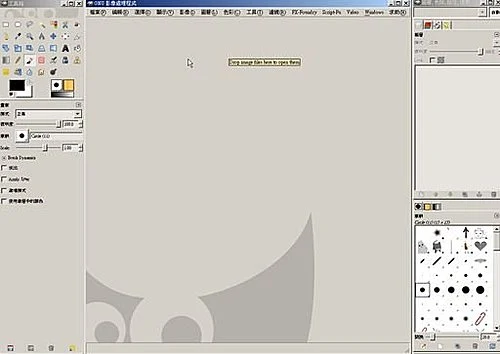
原主工具視窗上的選單移除,所有的選單都跟影像視窗合併
另程式啟動時會新增一個空的影像視窗以供處理
其它還有新增一些新功能,如
自由選取工具加入多邊形選取
Brush dynamics,新增一些參數來控制在使用筆刷時的一些效果
...
詳細參考官網上的 Release Notes
這是新版本的介面
原主工具視窗上的選單移除,所有的選單都跟影像視窗合併
另程式啟動時會新增一個空的影像視窗以供處理
其它還有新增一些新功能,如
自由選取工具加入多邊形選取
Brush dynamics,新增一些參數來控制在使用筆刷時的一些效果
...
詳細參考官網上的 Release Notes
訂閱:
文章 (Atom)